Test inboxes for signup and OTP flows, that your whole team can see.
Get a receive-only email address in one click, use it as the email for a test account, and read the verification code in the browser, from the Chrome extension, or from your Playwright or Cypress test. Try one right now, no account needed.
No credit card required · Free plan available · Receive-only inboxes

Your inboxes, in the toolbar.
Sign in once, and every inbox in your workspace is one click away while you test — the verification code is highlighted the moment the email lands.
- Your workspace inboxes and their latest mail, with an unread badge
- Verification code detected and copied in one click
- Right-click any email field to fill it; right-click the code field to paste the OTP
Chrome 116+ · free with every Inflovy account
Every signup flow needs a real inbox. None of the usual options were built for testing.
You need a unique address for every test account, the verification code the moment it arrives, and a place the whole team can look. Real inboxes get polluted, temp-mail is public and short-lived, and QA tools price the first inbox and every extra pair of eyes.
Gmail "+" aliases
Sites strip the "+", Gmail silently de-dupes identical test emails, and nobody else on the team can see the code.
Public temp-mail
Anyone can read the inbox, it is gone in a couple of hours, and more and more signup forms block the domains.
QA email tools
The first inbox sits behind a paywall and every teammate who wants to read an OTP is another seat on the bill.
How to test a signup or OTP flow with Inflovy.
No DNS setup, no forwarding rules, no SMTP configuration. Three steps, the first one on this page.
Get an inbox
Create one on this page in a click, or from the dashboard, the Chrome extension, or the API. It is receive-only and private to you or your workspace.
Sign up with its address
Use it as the email for the test account, password reset, magic link, or 2FA flow you are testing. Every message lands within seconds.
Read the code
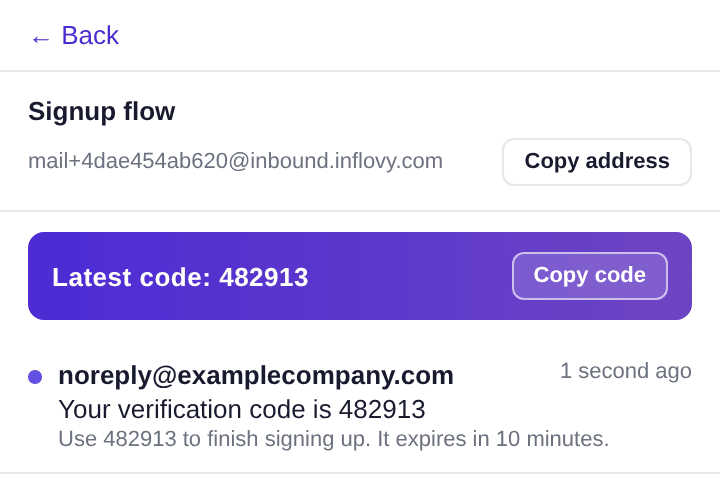
The verification code is detected and shown as a copy chip. Read it in the browser, paste it from the extension, or wait for it in your test.
Wait for the email from Playwright or Cypress.
On Pro and Team, a test creates an inbox, signs up with it, and calls wait. The call returns within about two seconds of the email landing, with the verification code already extracted. Under ten lines, no polling.
No polling loop in your test
The wait call holds open for up to 60 seconds and returns as soon as the message arrives. No sleep(), no retry helper, no flaky IMAP client.
The code is already extracted
Every message carries verificationCode, candidates[] and links[] so the test reads a field instead of parsing HTML.
One inbox per test run
Create an inbox in the test, delete it in teardown. Parallel runs never share an address or a code.
What teams use test inboxes for.
Anywhere a flow needs an email address that is not a real person's.
Manual QA of signup flows
Every test account needs a fresh email, and the code always lands in someone else’s inbox.
One inbox per test account, the code shown on screen, visible to the whole team.
Automated E2E tests
Tests poll an IMAP mailbox for 5–10 seconds and flake when the email is slow.
Create an inbox from the test, call wait, get the message and the extracted code in one response.
Staging and dev environments
Staging signups pile up in a shared Gmail nobody owns.
One inbox per environment inside a project, searchable, with retention you can see.
Password reset, magic link, 2FA
Time-sensitive links get forwarded over Slack and expire before anyone clicks them.
Links are extracted from every message and one click away for anyone on the team.
Vendor and tool accounts
The SaaS login is tied to whoever set it up, and they left last quarter.
Register the account to a workspace-owned inbox so the OTP reaches the team, not a person.
Browser agents
Each agent needs its own email to sign up anywhere, and a way to read the code back.
Create an inbox per agent through the API and read the verification code programmatically.
Every test account gets its own inbox. The whole team sees all of them.
Group inboxes into projects (Signup, Staging, Mobile app), invite the team, and everyone reads the same messages and codes. No shared password, no forwarding, no single point of failure when someone is out.
Every inbox is its own stream
Signup, password reset and magic-link inboxes stay separate; the project dashboard shows all of them at once.
Members are free on every plan
Invite the whole team. The Free plan includes 3 members; Team includes 15. Nobody pays per seat to read an OTP.
Search across all of them
Looking for the code a customer got last Tuesday? Search the project by sender, subject or address.
mail+…@inbound.inflovy.com
signup-e2e
mail+…@inbound.inflovy.com
password-reset
mail+…@inbound.inflovy.com
magic-link
mail+…@inbound.inflovy.com
ios-beta
Gmail "+" aliases versus a test inbox.
Without Inflovy
- A "+" alias per test account, in one engineer’s Gmail
- The OTP is in someone else’s inbox when you need it
- Public temp-mail domains rejected by the signup form
- 5–10 seconds of IMAP polling in every test
- Test mail gone after a day, or kept forever in a shared mailbox
With Inflovy
- A fresh, private inbox in one click, no account required
- Every teammate sees the same inboxes and codes
- Receive-only addresses on a domain built for testing
- wait returns within ~2 seconds of the email arriving
- Retention you choose: 7, 30 or 90 days, shown on every message
Starts where temp-mail starts. Ends where the QA tools end.
Zero friction for the first inbox, then a workspace, an extension and an API when you need them. The account is the reward, not the toll.
Receive-only by design
An Inflovy address can never send. Nothing can be spammed or phished from your name.
Private by default
Inboxes belong to your browser, then to your workspace. Nobody outside it can read them.
Expiry you can see
Every message shows when it will be deleted. Upgrading buys longer retention, never a surprise.
Start with the flow that hurts most.
Short, specific guides for the ways teams use test inboxes, plus the API reference.
The details a developer checks before signing up.
Inbound mail is routed through Cloudflare, parsed, de-duplicated and stored within seconds; the code and links are extracted on the way in.
API with a wait endpoint
Create an inbox, then GET /v1/inboxes/:id/messages/wait?timeout=30 blocks until the email lands and returns it with verificationCode and links[] extracted. Pro and Team.
Webhooks
A signed POST for every message that lands in a workspace inbox, with retries and delivery history. Team.
Retention per plan
Messages are kept 7 days on Free, 30 on Pro, 90 on Team; an instant inbox lives 24 hours unless you keep it. Members are never charged per seat.
Questions developers ask before they sign up.
Do I need an account to try it?
No. Create an instant inbox on this page and use it right away; it lives for 24 hours and is private to your browser. If you want to keep it, share it with a team, or read it from a test, click "Keep this inbox" and sign up. The messages come with you.
How is Inflovy different from temp-mail or Mailinator?
Temp-mail inboxes are public, anonymous and gone in hours. An Inflovy inbox is private to you or your workspace, shows the verification code as soon as it arrives, keeps messages for 7 to 90 days depending on plan, and can be read by your whole team, from a Chrome extension, or from an API.
How is it different from Mailosaur or MailSlurp?
Those are API-first QA tools that start at around $19 to $20 per month with no free plan and charge per user. Inflovy starts free, is built for humans first (web inbox, Chrome extension) and adds the API on paid plans. Members are never a priced unit.
Can my Playwright or Cypress test wait for the email?
Yes. On Pro and Team, create an API key, create an inbox from the test, sign up with its address, then call the wait endpoint. It returns the message, the extracted verification code and the links within about two seconds of the email landing.
How long are messages kept?
Instant inboxes: 24 hours. Free: 7 days. Pro: 30 days. Team: 90 days. Every message shows its own expiry date and is marked before it is deleted.
Can I send email from an Inflovy inbox?
No. Inflovy is receive-only by design, so an Inflovy address can never be used to send spam or phishing from your name.
Will signup forms block the domain?
Every inbox service carries that risk. Inflovy addresses are private, receive-only and not on public disposable-domain lists; custom domains for teams are on the roadmap.
Your next test account deserves its own inbox.
Create one at the top of this page, keep it when you sign up, and invite the team.10 inboxes and 3 members on the free plan; no credit card.